
Key takeaways
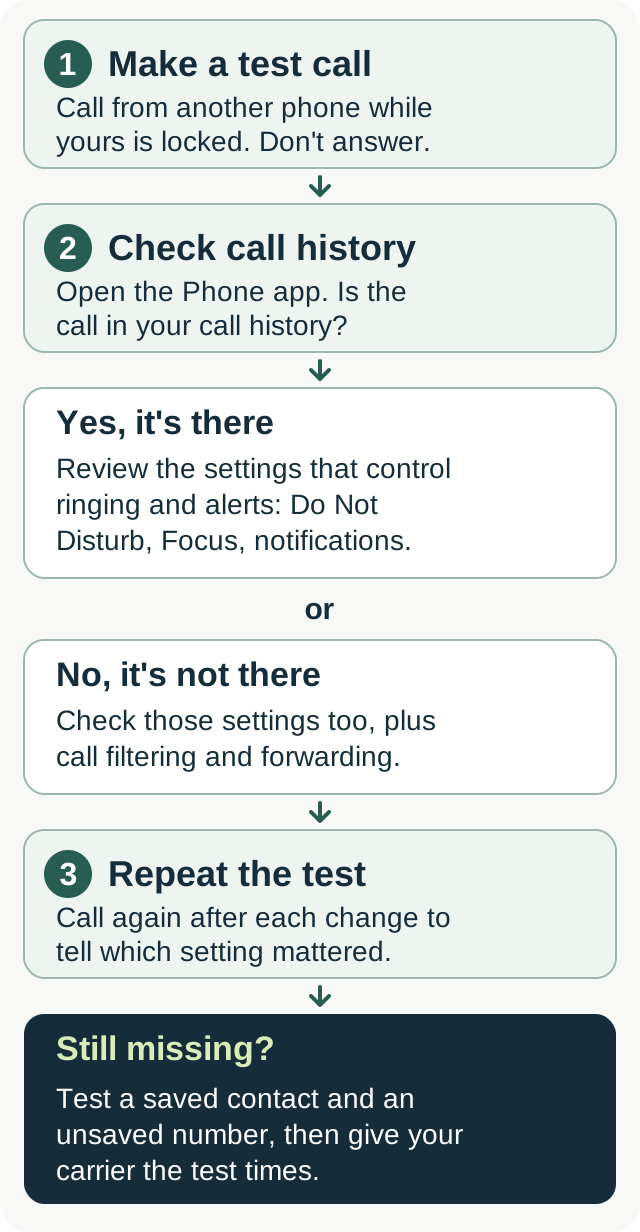
Check your call history first when missed calls don't show on your phone. If the call is listed, review Do Not Disturb or Focus and the Phone app's notifications. If it isn't, check call filtering and forwarding as well. Have someone call from another phone after each change to tell which setting affected the result.
On iPhone, check the Unknown Callers and Spam lists if you use those filters. Android settings vary by phone and dialer.
Use your carrier's instructions before changing forwarding. Avoid clearing every rule as a troubleshooting shortcut, since you could remove intentional voicemail or answering-service routing.
Glossary
Call history is the list of calls shown in your Phone app.
A notification badge is the indicator on an app icon that shows there's something to check. It's separate from a banner or Lock Screen alert.
Do Not Disturb is a mode that limits interruptions according to the rules you choose.
Focus is Apple's set of modes for controlling which people and apps can interrupt you.
Call forwarding sends incoming calls to another number, either for every call or under conditions such as a busy line or no answer.
Why am I not seeing missed calls on my phone?
Open your Phone app and check the call history first. If the call is there, review the settings that control ringing and notifications. If it's absent, check filtering and forwarding too.
Do Not Disturb or Focus can silence calls. Phone app settings can hide banners or badges. Filtering can move calls into another list or suppress alerts, while forwarding can send a call elsewhere before this phone rings.
Start with a test call
Have someone call from another phone while yours is locked. Let the call go unanswered, then check the call history and notification area. Note what the caller heard and whether your phone rang.
Repeat the test call after each change. That gives you a way to tell which setting affected the result.
How do I get missed-call notifications back on Android?
Check the Phone app's notifications
Check the app set as your default Phone app. If you've installed another dialer, confirm which one handles your calls before changing its settings.
Open Settings > Notifications > App notifications, then select Phone. You can also try holding the Phone app icon and opening App info > Notifications. Menu names vary by device.
Turn on notifications where the control is available. If the app shows notification categories, open "Missed calls" and choose "Alerting" or "Alert" if you want a sound. Check Lock Screen visibility too. Google explains the app and category controls.
On some Samsung phones, you first need to enable "Manage notification categories for each app" under Settings > Notifications > Advanced settings. Then return to the Phone app's notification settings. Samsung's instructions cover that extra step.
Check battery settings for delayed app alerts
If you use an internet-calling or companion app and its alerts arrive only when you open it, check that app's background battery and data settings using its provider's instructions.
Don't put every phone app on unrestricted battery use. Google's Pixel guidance recommends keeping optimization enabled, and Battery Saver leaves essential apps such as Phone available. A delayed alert needs a test before you change settings across several apps.
Test with the screen off, as it would be while you're working. Check whether the call is recorded and when the alert arrives.
Clear the Phone app's cache
If the Phone app's display is still misbehaving, try Settings > Apps > Phone > Storage, then "Clear cache," if your phone offers it. Restart the phone and repeat the test call.
Clearing cache removes temporary data. Clearing storage or data resets app data, so check your device's instructions before choosing it. Clearing cache won't recover a deleted call-history entry.
How do I show missed calls on iPhone?
Enable Phone notifications
Open Settings > Notifications > Phone. Check "Allow Notifications" and choose the alert locations you want, such as Lock Screen, Notification Center, and Banners. Turn on Badges if you want an indicator on the app icon.
Lock Screen, Notification Center, Banners, and Badges are separate notification settings, so a badge can be visible while another alert type is off.
Check the missed-calls list
Open Phone. Depending on your layout, open Calls or Recents, then choose Missed. In the Unified layout, tap the Filter button to find it.
Check Unknown Callers and Spam if you've enabled those filters. A call can be in one of those lists even when you don't see it in your usual view. Apple explains the Phone app's layouts and filters.
Check a badge that won't clear
Review the missed-calls list and voicemail, then restart the phone if the Phone app's badge still appears wrong. Test a new call afterward. The badge alone won't tell you whether a call rang or how it was handled.
How do Do Not Disturb and Focus affect missed-call alerts?
Do Not Disturb and Focus can silence ringing and notifications according to their settings. Check whether a mode is active now and whether a schedule turns it on during working hours, at night, or while driving.
iPhone Focus and unknown callers
Open Settings > Focus and select the mode you use. Under People, review who is allowed or silenced and the "Calls From" options. Adding Phone as an allowed app doesn't settle which callers can get through. Apple's Focus settings distinguish people from apps.
If you allow calls only from Favorites or selected contacts, new customers may be silenced. Choose the calling rules you need and test with a number outside your contacts.
Also open Settings > Apps > Phone and review "Screen Unknown Callers." On versions that show these choices, "Never" lets unsaved numbers ring normally, while "Silence" sends them to voicemail. Older versions may show "Silence Unknown Callers" instead.
Silenced calls can still appear in call history. A separate Unknown Callers filter moves those missed calls and voicemails into its own list. Apple documents screening, silencing, and filtering separately.
Android Do Not Disturb
Search Settings for "Do Not Disturb" or open Modes if your phone uses that menu. Select the active mode and review its People, Calls, or notification-filter options. Check any automatic schedules as well.
If calls are allowed only from starred contacts, a first-time customer may be silenced. Google's current instructions cover Modes and Do Not Disturb.
Repeat callers
iPhone and Android both offer settings that can allow a repeated call through. Check whether the option is enabled and which interval your device uses. It still leaves first-time callers subject to your usual rules.
Could call forwarding be hiding my missed calls?
Forwarding can send a call to another number before your phone rings. Unconditional forwarding sends every call elsewhere. Conditional forwarding applies when your line is busy or you don't answer, depending on the setup.
Check the forwarding settings
On iPhone, look under Settings > Apps > Phone > Call Forwarding if your carrier provides that control. Conditional forwarding may need to be checked with the carrier separately.
For Android or carrier-managed forwarding, use your provider's current instructions for your line. Codes such as *#21#, *#61#, and *#67# aren't a universal status check. An unfamiliar destination can be your carrier's voicemail number, so ask what it does before changing it.
Don't dial *72 to see whether forwarding is active. On supported Verizon lines, *72 turns forwarding on.
Turn off only the forwarding you mean to remove
Ask your carrier how to disable the specific forwarding rule you want to remove. A code that clears several forwarding rules could remove voicemail or answering-service routing you intended to keep.
Forwarding codes vary by carrier and service. T-Mobile's code list illustrates why a generic instruction to dial ##002# isn't enough. Confirm the effect of a code before using it, then make another test call.
When forwarding is intentional
If you forward calls to an answering service, check its call records and messages. Your phone's missed-calls list may not show every call handled elsewhere.
For a business setup, our call forwarding guide explains how to choose and test the destination.
How do I take a screenshot of my missed-calls list?
On iPhone
Open the missed-calls list. On an iPhone with Face ID, press the side button and volume up together, then release. On a model with a Home button, press Home and the side button, or Home and the top button if that's the button your model has.
Save the screenshot to Photos. Apple's screenshot instructions show the button combinations.
On Android
Open the call history, then press power and volume down together. If that doesn't work, check your manufacturer's screenshot instructions. Some Samsung phones also offer a palm-swipe gesture.
Before sharing it
Crop out or cover unrelated caller numbers and personal contacts. Keep the dates, times, and call-status indicators needed to explain the problem. Check the saved image before sending it.
What if missed calls still don't show?
Test with another number
Try a number in your contacts and one that isn't saved. Check whether each call rings, appears in history, and produces an alert. Tell the caller to note whether they heard ringing, voicemail, or something else.
Consider network settings when calls aren't arriving
If calls fail or don't reach the phone, review network troubleshooting with your carrier. A network reset is a later step; it isn't a guaranteed fix for a missing badge.
On iPhone, the network reset path is Settings > General > Transfer or Reset iPhone > Reset > Reset Network Settings. This removes saved Wi-Fi passwords and other network settings, including previously used VPN and APN settings. Apple describes what the reset changes.
Android reset menus vary. Some phones separate mobile-network settings from Bluetooth and Wi-Fi resets. Check the confirmation screen and your manufacturer's instructions before proceeding.
Contact your carrier
Give the carrier the test times, what each caller heard, and whether the calls appeared in your history. Ask it to check the line, forwarding, voicemail routing, and any service issue affecting incoming calls.
When should a business use forwarding or an answering service?
If you can't answer while working, fixing notifications will help you see callbacks you owe. You still need a plan for the caller who needs a response while you're on the job.
Voicemail can take a message. A human or AI answering service can handle more of the conversation, depending on the service and the rules you agree. Check what it can book, what needs your judgment, and what happens when no appointment is available.
Test the outcomes of an answering service before relying on it. Try an after-hours inquiry, a caller who changes their mind, and a question outside the agreed scope. For a booking, check that the event appears on the right calendar with the right arrival window. For a callback, check that you receive the message.
CallBooking.ai handles forwarded calls for home service businesses and follows the agreed booking, callback, or configured on-call process. Calendar connections and the call flow need testing before activation. We don't quote repair prices or diagnose problems.
CallBooking.ai costs from $149 per calendar month, with 40, 100 or 200 billable calls included depending on the plan. Additional usage is billed separately.
FAQ
Why did missed calls disappear from my call log?
Check the view and filters first, then review call blocking and forwarding. The cause depends on whether the call reached this phone and how the Phone app handled it. Clearing cache removes temporary files; it won't restore deleted history.
Can I see calls from blocked or filtered numbers?
Whether you can see calls from blocked or filtered numbers depends on the phone and the type of filtering. In Google's Phone app, filtered spam calls remain in history even when notifications are suppressed. Google says calls received while a number was manually blocked don't appear in its call history.
On iPhone, check any Unknown Callers or Spam list you've enabled. Apple says blocked callers can still leave voicemail, though you won't get a notification.
Why does my iPhone show a badge without a notification?
Badges and alert locations have separate settings. Check Settings > Notifications > Phone for Banners and Lock Screen alerts, then review any active Focus. Open Phone to see which call or voicemail needs attention.
Can I get missed-call alerts on my smartwatch?
Check the Phone notification options in the watch's companion app and test with the phone locked. Apple says notifications normally appear on the iPhone when it's unlocked, or on an unlocked Apple Watch when the iPhone is locked or asleep, subject to connection and notification settings.
For Wear OS, check the watch connection and which app notifications are allowed in its companion app. Google's watch troubleshooting covers those controls.
Does *73 delete missed calls or stop forwarding?
*73 disables call forwarding on services that support the code. It doesn't restore missing call-history entries. Use your carrier's instructions to confirm which forwarding rules it changes, then test whether calls reach your phone.