
Key takeaways
Pick Goodcall if you want to build an AI phone agent yourself, try a free demo agent and be answering today. Pick CallBooking.ai if you want a person to set up and test your line with you, a service-area check before every booking, arrival windows and calls answered in English or Spanish.
- Price both at your own call volume: as listed on goodcall.com on 12 November 2026, Goodcall starts at $79 a month for 100 unique customers, and CallBooking.ai starts at $149 USD a month for 40 billable calls. Goodcall counts different callers; CallBooking.ai counts calls of 60 seconds or more.
- If every job must be created in Jobber, ServiceTitan, FieldEdge or Housecall Pro, CallBooking.ai is not the fit: it is built for shops that run no field-service software and books into your calendar instead.
- You can keep your business number with either one through call forwarding. Test that the forwarded line reaches the assistant before your customers use it.
- Make the same four test calls to both before you pay: ask for a visit, give a ZIP outside your area, call after hours and ask for a person. Then check what landed in your calendar.
What is the difference between CallBooking.ai and Goodcall?
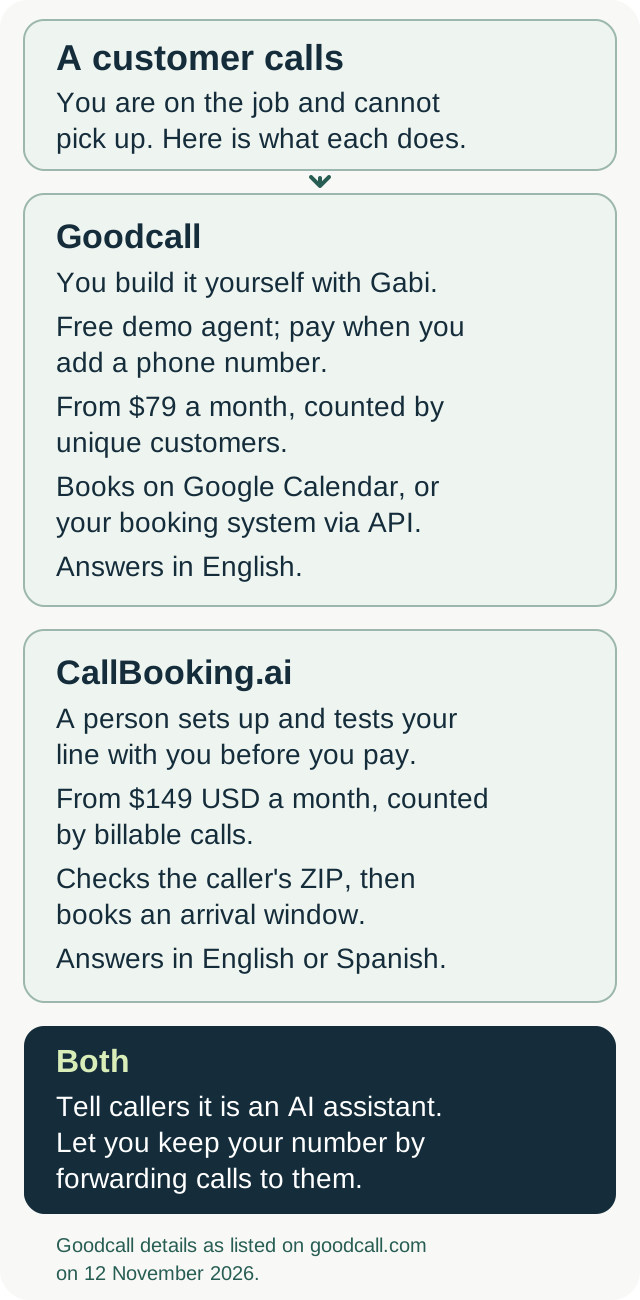
Goodcall is an AI answering service and receptionist for small businesses that you build yourself by describing your business to Gabi, the agent that builds and runs yours. CallBooking.ai is an AI answering service for home service businesses in plumbing, heating and cooling, electrical, septic and drain, set up and tested with you by a person.
Both answer when you are under a sink or on a roof, and both tell callers they are speaking with an AI assistant. The differences are in how you pay, how a job gets booked, who sets it up and which languages your callers can use.
How does each one charge?
Goodcall charges per unique customer, and its entry price is lower. As listed on goodcall.com on 12 November 2026, Goodcall's pricing page shows Starter at $79 a month for 100 unique customers a month, then 79¢ each; Growth at $129 a month for 500, then 26¢ each; and Scale at $299 a month for 2,000, then 15¢ each. Goodcall puts Starter at about 150 calls a month. Above 2,000 customers a month there is Enterprise volume pricing.
Goodcall counts one phone number once a month, so the same person calling five times in a month is one customer, and spam and wrong numbers don't count. It does not charge by the minute. Every plan is month to month, includes a local phone number and has no setup fee. Each plan also sets limits on workers, external tools, team members and how long call history is kept.
CallBooking.ai charges per billable call. There are three plans: $149 USD per month for 40 billable calls, $299 for 100, or $499 for 200. Additional billable calls cost $3, $2 and $1 on those plans. A billable call lasts at least 60 seconds; shorter calls are not billed. Setup is $0. You can request a refund of your first monthly fee within 14 days of activation; additional usage charges remain payable. Read the guarantee and billing terms.
Because the two count differently, take last month's calls and count two things: how many different numbers called, and how many calls lasted a minute or more. Price Goodcall on the first and CallBooking.ai on the second.
How does each one book a job?
CallBooking.ai books arrival windows, and only inside your service area. It checks the caller's ZIP against the service area you gave us before it books a job, and no job is booked outside that area. It can read out windows before that check; the check is what blocks the booking. Every arrival window it offers comes from your real schedule, and it never books one your schedule cannot hold.
Bookings go into a calendar you have connected and tested: Google Calendar, Microsoft 365, Outlook.com, Exchange Online (Microsoft 365), Apple iCloud or another CalDAV calendar. Availability depends on the connection service, account permissions and a successful test booking before payment and activation.
Goodcall's homepage describes its agent checking your calendar, offering the caller a couple of times that fit your day, putting the booking on your calendar and texting everyone the details. Its How it works page says it can add bookings to your Google Calendar, or connect to your booking system through its API.
The Goodcall pages we read on 12 November 2026 do not describe checking a caller's ZIP against a service area, or booking into arrival windows rather than set times. That does not mean it cannot be set up. If booking only inside your service area matters to you, ask Goodcall to show it on a practice call before you rely on it.
How does setup work?
Goodcall is self-serve. You tell Gabi about your business, by typing or talking, or hand it your website, and Gabi writes the greeting, the questions and the steps. Gabi runs practice calls, you approve the changes, and Goodcall says your agent can be answering today. You can build and test the free demo agent at no cost and start paying when you add a phone number. If you want to make changes yourself, whenever you like, that is a real advantage.
CallBooking.ai is set up and tested by a person, not a portal. We talk through your calls, agree the scope, call rules and billing terms in writing, and test your configured call flow with you before payment and activation. We take on a few businesses at a time, so we confirm fit and setup availability before activation. Check calendar fit and setup availability.
What do your callers hear?
Both tell callers they are speaking with an AI assistant. Goodcall's How it works page says its agent speaks English today. CallBooking.ai answers calls in English or Spanish, following whichever of the two the caller speaks.
When a caller needs a person, Goodcall transfers to the contacts you set. It retries a busy line and can try the next contact when nobody answers, up to three contacts. Its agent can also text a caller a confirmation or a link. CallBooking.ai stops trying to book, writes down why they called, and then transfers to the number you gave us when your office is open. It never promises that a person is available or that a transfer will connect.
Goodcall records and transcribes every call so you can review it in the app. CallBooking.ai says the call is recorded before it collects anything, and it does not quote prices or diagnose a problem; your team handles estimates and diagnosis.
Which one fits a shop that runs field-service software?
CallBooking.ai is built for shops that run no field-service software: your calendar and your phone are the whole setup. It has no native Jobber, ServiceTitan, FieldEdge or Housecall Pro integration, and calendar access does not create jobs in those systems. If every job must land in one of them, CallBooking.ai is not the right fit.
Goodcall's FAQ lists Google Calendar, Google Sheets and HighLevel as native connections, Zapier for more than 10,000 other apps, and a configured API tool or MCP server for any other system. If you run field-service software, ask Goodcall to show a test call creating a job in your system before you switch.
Can you keep your business number with either one?
Yes. Both work by forwarding calls from the carrier that holds your number, so your number stays where it is. Goodcall also includes a local number on every plan. CallBooking.ai works where your phone provider supports call forwarding, and you can forward all day, after hours or only when you're busy.
On a Verizon mobile line, Verizon's call forwarding FAQs say *72 plus the 10-digit number forwards your calls, *71 plus the number forwards only the calls you don't answer, and *73 turns forwarding off. If you don't have unlimited minutes, Verizon bills forwarded calls according to your plan.
What should you test before you choose?
Make the same four calls to both: ask for a visit tomorrow, give a ZIP outside your service area, call after hours and ask for a person. Check what landed in your calendar and what reached you.
Goodcall's free demo agent lets you build, test and hear your agent at no cost, and you can call it from your browser. CallBooking.ai's demo line answers on +1 (502) 260-3056 for a fictional business, Demo Plumbing (test account), and your own configured call flow is tested with you before payment and activation. Build your call coverage plan.
Questions about CallBooking.ai and Goodcall
Is Goodcall cheaper than CallBooking.ai?
Goodcall's lowest plan costs less: $79 a month for 100 unique customers, as listed on goodcall.com on 12 November 2026, against CallBooking.ai's $149 USD a month for 40 billable calls. The two count usage differently, so price both against last month's calls and how many different numbers called.
Does Goodcall check the caller's service area before booking?
The Goodcall pages we read on 12 November 2026 describe booking on Google Calendar or through your booking system's API, but do not describe a ZIP or service-area check. Ask Goodcall to show one on a practice call. CallBooking.ai checks the caller's ZIP against your service area before it books a job.
Does Goodcall or CallBooking.ai answer in Spanish?
Goodcall's How it works page says its agent speaks English today. CallBooking.ai answers calls in English or Spanish, following whichever of the two the caller speaks.
Can I try either one before paying?
Yes. Goodcall offers a free demo agent, and you start paying when you add a phone number. CallBooking.ai's demo line answers on +1 (502) 260-3056, and we test your configured call flow with you before payment and activation.
Does CallBooking.ai work with Jobber or ServiceTitan?
CallBooking.ai has no native Jobber, ServiceTitan, FieldEdge or Housecall Pro integration, and calendar access does not create jobs in those systems. It is built for shops that run no field-service software.
Glossary
A demo agent is Goodcall's free alternative to a trial: you build it, test it and hear it answer at no cost, and start paying when you add a phone number and pick a plan.
A service-area check confirms the caller's ZIP code is inside the area you gave us before a booking is made. A caller outside it is not booked.
An arrival window is the span of time a visit is booked into, such as 8am to noon, rather than a fixed start time. Home service work is scheduled this way because travel and job length vary.
A unique customer is how Goodcall counts usage: one phone number, once a month. The same person calling five times in a month is one customer.
A billable call is how CallBooking.ai counts usage: a call lasting at least 60 seconds. Shorter calls are not billed.
Field-service software is a job management system such as Jobber, ServiceTitan, FieldEdge or Housecall Pro, where jobs are created, assigned and invoiced.
Call forwarding is a setting on your line, kept with your carrier, that sends calls to another number: every call, or only the ones you don't answer.
Sources checked
Goodcall details were checked on 12 November 2026 against its pricing page, FAQ, How it works page and homepage. Plans and features change, so check them again before you choose. Verizon's forwarding codes and billing come from its call forwarding FAQs, checked the same day. CallBooking.ai's current offer is on the pricing section and service terms.