
Key takeaways
Set up missed-call text-back in five steps: confirm your number supports the missed-call trigger; set up consent records, opt-out handling and any required registration, then load a short first message; set a reply target, such as 60 seconds, and sending hours; route replies to an inbox someone monitors; and test the whole path before going live.
An incoming call doesn't automatically authorize an automated text. Confirm the consent your messaging provider requires, keep evidence of permission, and check opt-outs before sending.
In the first message, name your business, ask one useful question, and include the required opt-out wording. Check the final message in your provider's editor, since character encoding affects SMS length.
Registration depends on the number and messaging service you use, so ask your provider which applies. When you test, call after hours, leave voicemail, call more than once, send STOP, and check any booking step.
Glossary
Missed-call text-back is a workflow that sends a text after an eligible unanswered call.
SMS is the text-messaging format used for these messages.
A2P means application-to-person messaging, where software sends a message to a person.
10DLC means ten-digit long code. A2P 10DLC is the registration system used for application messaging to US recipients over local ten-digit numbers.
The reply inbox is where incoming texts arrive so you or your team can respond.
What happens when a missed call triggers an automatic text?
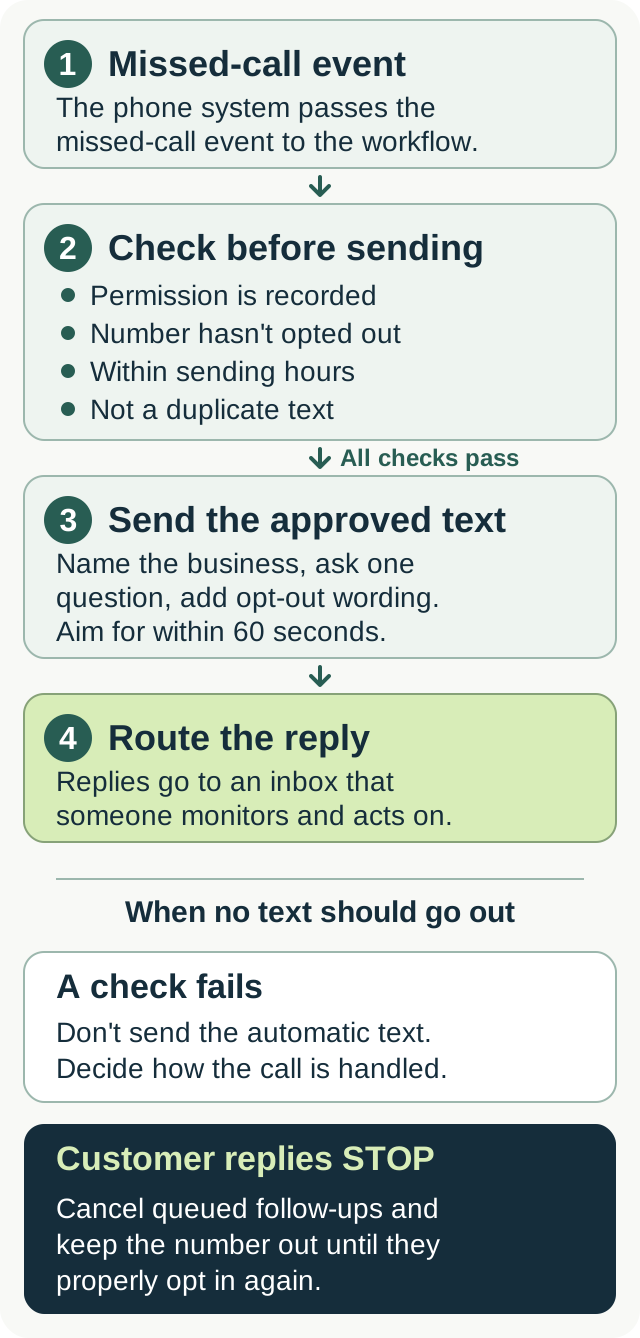
The phone system records an unanswered call and passes the event to a messaging workflow. If the number is eligible and the required permission is recorded, the system sends the approved reply.
The trigger and the timer
Check what your provider counts as a missed call. A call that rings out, a call that reaches voicemail, and a caller who disconnects before an agent answers can trigger different events. Set the workflow for the event you actually want to handle.
Decide what happens if the caller leaves voicemail or calls again. Use the provider's controls to avoid repeated messages to the same person. Test those cases instead of assuming every call record should create a text.
What the caller sees
The caller receives a text from the sending number you've configured. Identify the business in the message, especially if that number differs from the one they called. Their reply goes to the texting service's supported inbox.
When can you text back, and what consent do you need?
An inbound call isn't an automatic SMS opt-in
A caller ID entry alone isn't evidence that someone agreed to automated texts. Before enabling the workflow, confirm what permission your provider requires for this use and how it must be recorded.
The TCPA's requirements depend on the message, sending technology, and recipient number. Provider policies also apply. For example, Twilio requires prior consent for business-initiated informational messages. Calling a text informational doesn't create a consent exemption.
The FCC's rules on calls and texts don't establish a general permission to send one automated text after any missed voice call. Have your provider review the proposed workflow against its current requirements before enabling it.
If someone texts your business first, you can respond within that conversation under the provider's rules. That exchange doesn't authorize unrelated or recurring messages.
Registration and carrier filtering
For application messages sent to US recipients using local ten-digit numbers, providers such as Twilio require A2P 10DLC registration (see Twilio's registration guide). The process covers the business and messaging use case, with sending numbers attached to the approved setup.
Number types other than local ten-digit numbers have different requirements. Toll-free numbers, for example, use a separate verification process. Ask your provider which registration or verification applies to your number. Registration doesn't replace consent or guarantee delivery.
Voicemail, website wording, and opt-outs
A greeting that says you'll text callers describes your plan. It doesn't record their agreement. Use a provider-approved opt-in process and save the wording, the customer's action, and when and how permission was given.
You can also invite callers to start a text conversation themselves. A greeting could say: "If we miss you, you can text [Business number] about booking a visit." Make sure that number receives replies and someone monitors them.
Include the required opt-out instructions in the first permitted message. Honor STOP and clear requests to stop, cancel queued follow-ups, and keep the number out of the workflow until the customer properly opts in again. Twilio's messaging policy covers identification, consent records, and opt-outs.
What should a missed-call text say?
Name your business, acknowledge the missed call, and ask one question. Keep the message short enough to read at a glance. Include the opt-out wording your provider requires.
A 160-character limit doesn't guarantee one SMS segment. Encoding changes the limit, and longer messages can be split and billed as several segments. Check your provider's message-length guidance and test the completed text after replacing placeholders.
Plumbing
"Hi, this is [Business]. Sorry we missed your call. Is this a burst pipe or a leak? Reply STOP to unsubscribe."
HVAC
"This is [Business]. Sorry we missed your call. No heat, no cool, or maintenance? Reply STOP to unsubscribe."
Electrical
"[Business] here. Sorry we missed your call. What needs looking at? Reply STOP to unsubscribe."
Septic and drain
"This is [Business]. Sorry we missed your call. Backup or routine service? Reply STOP to unsubscribe."
Use the sample texts for plumbing, HVAC, electrical, and septic and drain as starting copy after confirming permission and your provider's requirements. Replace the business name and use your actual service area when answering the reply. Don't promise an arrival window until you've checked availability.
Links and follow-ups
The first text can start with a question. Send a booking link when it fits the permitted conversation and the customer needs it. Test the actual link and destination page.
Avoid automatically sending another message just because the caller hasn't replied. Check whether a follow-up is covered by their permission, whether they've opted out, and whether it falls within your sending rules.
How quickly should a text-back be sent?
For calls you're allowed to text, aim to send the first message within 60 seconds of the missed-call event. Treat that as an operating target. Check actual delivery and replies before deciding whether it works for your business.
Set sending hours for your message type and the recipient's location using your provider's current requirements. Decide how calls outside those hours will be handled and when someone will respond.
An automatic message also needs a reply plan. If the caller texts back immediately, someone needs to see it and act on it.
How do you set up missed-call text messages?
Step 1: Confirm the number and feature
Check which system receives your calls and which system can send and receive texts from the intended number. Forwarding a voice call doesn't automatically move text-message handling to the destination.
Confirm that your phone or texting service plan supports the missed-call trigger you need. Grasshopper documents an Instant Response feature, but you shouldn't assume every business phone service has the same automation.
If you use Google Voice, check its acceptable-use policy, which prohibits automated messaging and scripts. Don't assume adding an outside tool makes an unsupported workflow acceptable.
Step 2: Set up permission checks and the message
Complete the required registration or verification. Configure consent records and the opt-out suppression list before enabling automatic sends. Load the first message and check its segment count.
If you use a follow-up or booking link, define when it can be sent. Keep it within the agreed purpose and stop it when the customer opts out.
Step 3: Set timing and sending hours
Choose the missed-call event, the reply target, and the permitted sending hours. Check the recipient-time-zone behavior with your provider.
Configure duplicate controls so repeated calls or retries don't create a series of unwanted texts. Test voicemail handling separately if you want a different response for callers who leave a message.
Step 4: Route replies to a monitored inbox
Choose an inbox you or your team checks during the hours you're offering a response. Turn on its supported alerts and test them on the phone you carry.
Don't assume replies to a second number will appear in your cell's native SMS app. Use the messaging provider's supported inbox or integration, then reply to the actual sending number during your test.
Step 5: Test the whole path
Use a second phone with the required permission recorded. Call, let it go unanswered, and check the text. Reply and confirm that the conversation reaches the right inbox. Test any booking link and check the resulting calendar event.
Repeat the missed-call test after hours, after leaving voicemail, and after calling more than once. Send STOP from the test phone and confirm the workflow suppresses later messages, including any queued follow-up.
If you use field service software
Check the feature and plan inside the platform you use. Jobber's SMS send-back belongs to its Receptionist workflow. Housecall Pro's Voice automation documents missed-call messages for existing customers. ServiceTitan's campaigns have their own account requirements, triggers, and sending rules.
Use the documentation for your actual account.
How does text-back compare with voicemail and call answering?
Voicemail lets callers leave a message. Text-back opens a text conversation when the number and permission allow it. An answering service handles the call itself, with booking or handoff depending on the service you've agreed.
Texting can support a booking link or an integrated scheduling conversation. A simple automatic acknowledgment still leaves someone to answer questions and confirm the visit.
Compare what voicemail, text-back, and call answering each actually do after hours, how each handles unavailable appointments, and what happens when the caller needs your judgment. Check the full cost, including usage and messaging charges.
CallBooking.ai's current call-answering offer covers home service calls, tested calendar booking, callback messages, and configured on-call handling. It doesn't promise live missed-call text-back. Confirm SMS availability separately if it's a requirement for your business.
CallBooking.ai doesn't quote repair prices or diagnose problems. Those questions need your judgment.
Which metrics show whether text-back is helping?
Reply rate
Track the share of eligible text recipients who reply. Use a consistent denominator and keep opted-out or suppressed numbers separate from messages actually sent.
Booking rate
Track which text conversations lead to confirmed visits on the calendar. Check the appointment itself, including the arrival window.
Time to send and reply
Measure the delay between the missed-call event and the outgoing text. Separately measure how long it takes your business to respond when the customer replies.
Jobs following a missed call
Record which bookings started with a missed call and continued by text. Attach completed-job value when you have it. A booking after a text doesn't prove the job would otherwise have been lost, so keep that distinction when estimating recovered revenue.
Review the text-back metrics weekly. If bookings aren't improving, check delivery, permission coverage, the message, and how replies are handled before deciding what to change.
Can you build text-back into your own voice AI agent?
Yes, you can build text-back into your own voice AI agent using a messaging provider that supports the workflow. Start with a defined missed-call event, then check consent, opt-outs, sending hours, and duplicate handling before a message is sent.
Test the reply path as carefully as the outgoing text. If the system offers booking, confirm that it creates the calendar event with the right service length and time zone. Test no availability and any rescheduling or cancellation actions you intend to offer.
Keep a record of each customer conversation, its outcome, and the next action. An out-of-scope pricing question needs a clear handoff to you. Compare the cost of building and maintaining that workflow with the specific features a paid provider can demonstrate.
FAQ
Does every automated text need 10DLC registration?
Texting registration requirements depend on the sending number, service, and destination. US application messaging over local ten-digit numbers uses A2P 10DLC. Other number types have separate requirements. Ask your provider what applies before sending.
What if a customer asks how much the repair costs?
Route a customer's pricing question to someone who can answer, or use an agreed message explaining the next step. Offer an arrival window only after checking availability. Don't leave the conversation in an inbox nobody monitors.
Is text-back the same as a callback message?
A text-back sends an SMS inviting a reply. A callback message records a request or information for a return call. Confirm which action your setup takes and when someone will follow up.
Can I use my existing business number?
Your existing business number may work for text-back. Confirm that your provider supports texting, registration, and the required trigger on that number. If you use a separate sending number, identify your business and make sure replies reach a monitored inbox.
How do I avoid texting spam callers?
Use the phone system's spam controls and check eligibility before sending. A ring-duration threshold doesn't prove that a caller is genuine or that they've agreed to texts. Review message logs and test duplicate suppression, but keep permission and opt-out checks in the workflow.